


Same-day On-demand

Steps To Place A Delivery Order
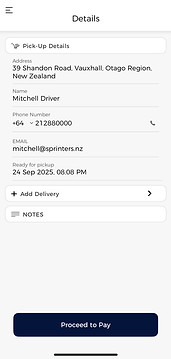
Step 1: Enter Pick-up/Delivery Details
-
Fill in the sender’s name, contact number, and the exact pickup address.
-
You can add any special instructions (e.g., “Leave at reception” or “Call on arrival”).
-
Provide the recipient’s name, contact number, and delivery address.
-
Add notes if needed (e.g., “Ring doorbell” or “Deliver to loading dock”).


Step 2: Choose Transport Mode
-
Select the best courier option based on your package size and urgency:
-
Bike 🚴♂️ – Ideal for small parcels and documents.
-
Car 🚗 – Great for medium-sized packages.
-
Van/Ute 🚐 – Best for bulkier items.
-
-
Instantly see estimated delivery time and cost before confirming.
Step 3: Confirm & Track
-
Tap Confirm Order and let Sprinters do the rest.
-
A courier will be assigned in minutes (if not seconds)
-
Track your delivery in real-time on the app—watch as your package moves across the city.



How Sprinters for Business
Solve Current Issues

From booking to delivery, Sprinters brings speed, transparency, and trust into every step of the journey.
Key Features
-
Instant job broadcasting to available couriers
-
Live tracking and customer notification system
-
Smart matching: Nearest and best-suited driver allocation
-
Driver availability status (online/offline toggle)
-
Dynamic pricing for urgent deliveries
-
Integrated proof of delivery (photo + e-signature)
-
Performance analytics dashboard for management
-
Customer rating system for service quality


